Customer orders in. Reviewed records out.
Read incoming orders, match customer part numbers, review uncertain fields, and deliver approved records to your systems.
Checked before every production release.
32 sample orders and 6 supplier invoices run live through the extraction gate on each promotion to production. Last pass: September 21, 2026.
Off until you turn it on, then earned.
Auto-approval starts disabled. When you enable it, the bar begins out of reach and lowers only as clean human approvals accumulate. Report a problem on any order and that customer's unattended status is removed at once. Per-customer grant and revoke is a beta target, off by default.
Built for machines as well as people.
REST API with an OpenAPI spec, an MCP server with 186 tools, and signed webhooks on every status change, including the one you are billed for.
Fits the way your orders already move.
Email · Upload · API · Manual entry
Use the documents your customers send, or enter an order on the same form.
API reference Shopify
Draft orders, OAuth
 QuickBooks
Finishing Intuit verification
 NetSuite
Guided setup
- Your REST endpoint
Signed and idempotent
Or CSV and EDI 850 export. QuickBooks Online uses Estimates; QuickBooks Desktop is not supported.
Multi-storefront routing is implemented but depends on verified destination-routing rollout; fan-out also depends on plan entitlement.
Explore integrationsFrom incoming order to a record you can use.
- 01
Intake
Connect an order inbox, upload a document, submit through the API, or enter a phone order by hand. Keep the source with the order.
- 02
Extract
Read PDFs, spreadsheets, scans and photos. Match customer part numbers to your catalogue and record confidence per field, without a template for each format.
- 03
Review
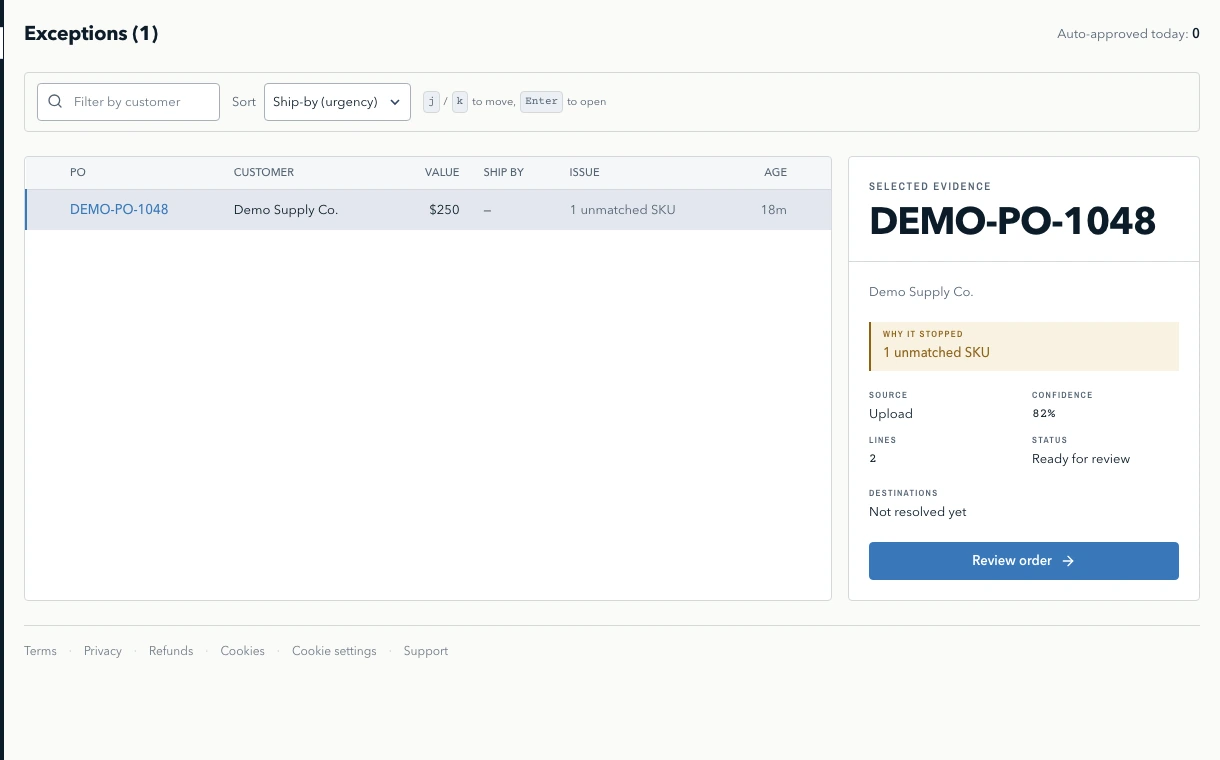
Check flagged fields beside the source document. A doubtful quantity can hold the whole order until review and validation requirements are satisfied.
- 04
Deliver
Send approved orders to a configured destination or export them. Keep the source, review history and destination record ID together in Poppelo.
See which lines need a decision.
Open the source document with View document to check the extracted order. Resolve flagged fields before the whole order moves forward.
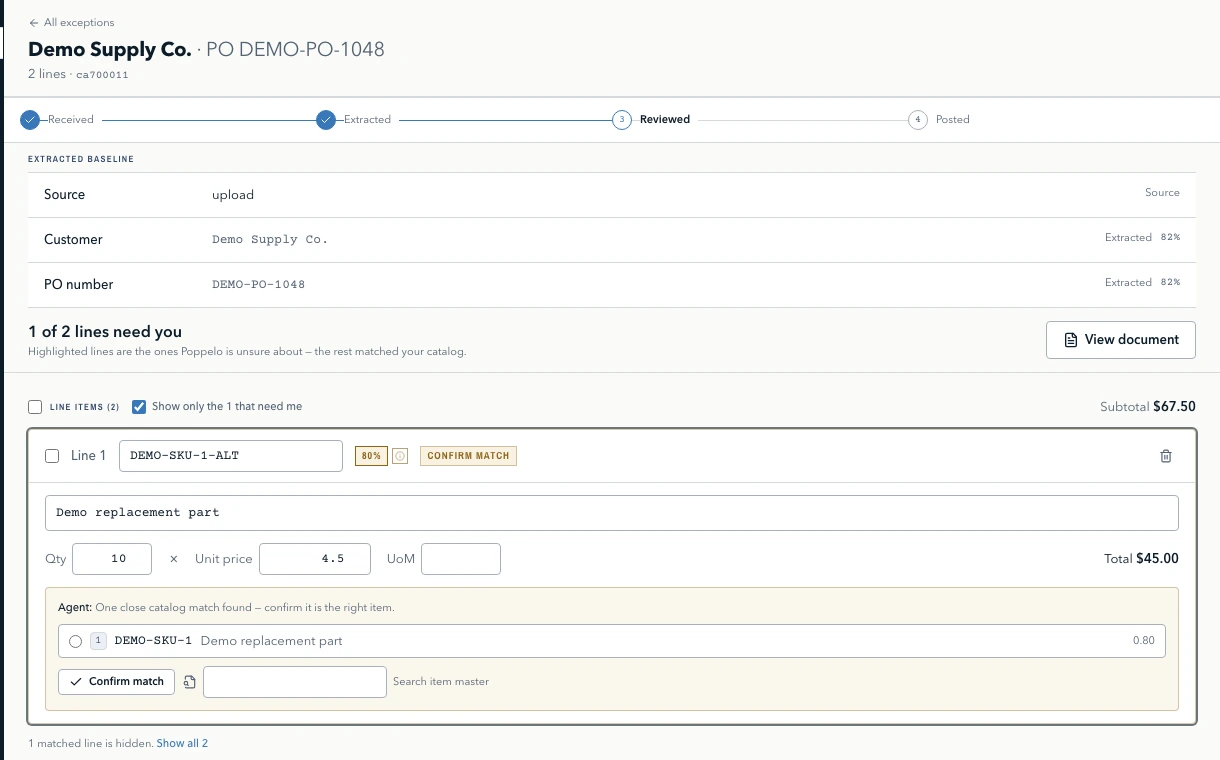
Less retyping. More informed decisions.
Saved corrections help match future orders for the same customer. Repeated patterns can become rules you review and approve. New formats, ambiguous matches and changed customer data can still need another review.
- Check, don’t type
- Every field arrives filled in with a score beside it. Your job is confirming a number, not keying an order.
- Review the fields that need attention
- Uncertain fields are flagged beside the source document. The whole order stays on hold until its review and validation requirements are satisfied.
- Nothing runs unattended until you say so
- Auto-approval stays off until you turn it on, and even then the bar starts out of reach and comes down only as clean approvals accumulate. You decide when it has earned the right, per customer.
- Reject rather than guess
- Orders below your configured reject threshold do not post automatically. The source document stays available in Poppelo for manual handling.
Trust is granted one customer at a time.
Field scores focus your review. Unattended approval also requires validation and customer policy checks to pass.
- Granted per customer
- Autonomy is granted to one customer against their record of clean orders. See the orders that earned it and what would have run unattended before you grant anything.
- Revoked when you report a problem
- Report a problem on an approved order and that customer loses unattended status immediately. Auto-approval is off by default and opens gradually as clean approvals accumulate.
- Verified senders
- An order claiming to be from an autonomous customer is held if the sender’s domain did not authenticate it. Generic IMAP mailboxes cannot prove this and are never treated as if they had.
- A record of the whole order
- Keep the source document, extracted fields, human changes and destination record ID. Corrections to records already delivered require handling in the destination system.
- Append-only audit log
- Database permissions restrict audit changes by application roles. Administrative access and retention policies must be configured and reviewed for your deployment.
- Scheduled audit archives
- A scheduled worker can export audit records to object storage. Retention and protection against overwrites depend on the configured bucket policy and verified archive jobs.
- Your data stays yours
- Export supported records through the application. Agree retention and offboarding arrangements with your team. SSO/SAML is available on Enterprise. Tenant-scoped controls restrict access; processing uses shared infrastructure.
Try a sample order.
Choose a clean document, a scan with a missing digit, or a spreadsheet with customer part numbers. See which fields need a decision.
Synthetic demonstration
Synthetic sample documents with illustrative confidence bands: high at 0.95, review down to 0.70, low below it. No model runs and no downstream records are created. Actual approval also requires validation and customer policy checks. Test your own documents during the trial to assess extraction quality.
Received: Email attachment · 300dpi scan
FROM: purchasing@brennanplumbing.example
SUBJ: PO 48821, please confirm
BRENNAN PLUMBING SUPPLY
1140 W. FOUNDRY RD · AKRON OH 44311

PURCHASE ORDER 48821
DATE 08/24/26   TERMS NET 30

 240 EA  1/2" COPPER ELBOW, 90 DEG
  60 EA  3/4" BRASS BALL VALVE, FULL PORT
  24 EA  PVC PRIMER, PURPLE, 16 OZ
  1? BG  1" PEX CRIMP RING, BAG/100

...page 1 of 2, remainder cut off in scan
This is what Brennan Plumbing sent. Read it and see what Poppelo makes of it, including the parts it refuses to guess at.
Before you hand over a card.
No charge for 14 days. A card is required. Cancel from Billing inside the trial and the card is never charged.
- Self-serve
- Core, Growth, Scale, with usage billed on auto-approved orders. No per-seat charges.See pricing
- Enterprise
- Custom volume allowances, SSO/SAML and integration requirements, with support and SLA terms agreed in your contract.Contact sales
- Will it read my customers’ documents?
- That is the first thing to test, and the trial exists to answer it. Connect the inbox your orders already arrive in and forward one real PO. You will see exactly what it read and what it flagged.
- What if it gets something wrong?
- Nothing below your reject threshold reaches your books at all. An uncertain line can hold the whole order, with the source document beside it. Unattended approval requires auto-approval to be enabled and all applicable confidence, validation, customer and policy checks to pass.
- How long does setup take?
- Connecting the inbox and Shopify is OAuth on both ends, so minutes rather than a project. QuickBooks Online is finishing Intuit production verification. NetSuite takes about an hour of an admin’s time. There are no templates to build and no per-customer rules to write.
- What does it cost to try?
- Nothing for 14 days. A card is required to start the trial and you can cancel from Billing at any point inside it, in which case the card is never charged.
Nine more questions
- Will I still be reviewing orders in a month?
- Some of them, deliberately, but fewer as you go. Auto-approval stays off until you switch it on, and even then the bar starts out of reach and comes down as clean approvals accumulate: orders a person approved without changing anything. So the safest orders begin running unattended early, rather than nothing running until some order count is reached. What changes from the very first order is the work: you are confirming fields it filled in, not typing them. From day one the Trust page shows what share of your orders would have run unattended on your settings.
- Where do approved orders go?
- Shopify connects with OAuth in a couple of clicks. QuickBooks Online is finishing Intuit production verification; contact sales and we will let you know the moment it is live. NetSuite is a guided setup you complete yourself; we verify the credentials against your account before storing them. Anything else can post to your own REST endpoint, signed and safe to retry. If none of those fit, orders come out as CSV or EDI 850. Shopify gets a draft order.
- Do you train on my documents?
- No. Your documents are not used to train models. A correction applies to that order; the same correction twice proposes a rule, and once you activate it, it applies to every later order from that customer. Nothing else is learned automatically. If you turn on partner examples, a new order from a customer is read beside up to two of that same customer’s orders you already approved; it is off unless you turn it on. Your data is separated by database row-level security on every API request, by a tenant prefix the storage layer enforces on every stored file, and by model calls that carry only your own documents. Processing runs on shared infrastructure.
- What about orders that arrive by phone?
- Enter those by hand on the same form. They get the same validation, the same routing to your system, and the same audit trail as a document that arrived by email; there is just no scan attached to them.
- What stops it running away with my orders?
- Nothing auto-approves unless you turn it on, and a new account starts with the bar raised out of reach, lowering only as clean approvals accumulate. Beyond that, fuzzy SKU matches never select themselves: the top three candidates are put in front of you. You can also hold any order that would otherwise auto-approve: a new customer, a line matched by similarity rather than exactly, or a customer your own records have on credit hold.
- What if a connection breaks?
- Credentials are checked against your live account before we store them, so a bad one fails at setup with a specific reason rather than on your first order. If a connection fails later, processing may retry or require manual handling. When a provider may already have accepted an order, it is held for a person to check before another attempt.
- Can I see what actually happened to an order?
- Every order carries the document it came from, what was read, what a person changed, and the ID of the record it became in your system, so you can point at any email and say exactly which order it turned into. The audit log is append-only, enforced by database permissions, and exported nightly to object storage.
- How is this different from a PDF parser or a Zapier plus ChatGPT setup?
- Those tools template a layout or ask a model to fill in a form, and when a field is unclear they tend to guess rather than leave it blank, the most common complaint against that category. Poppelo scores every field, and an unclear one holds the whole order for you instead of posting a guess. A changed layout does not require a new template, because there is no template to break.
- Do we need to get our customers on EDI or a B2B portal instead?
- No. Most customers keep emailing a PDF regardless of what ordering portal you build, because that is the channel they already trust, and EDI is priced and built for the largest trading partners. Poppelo reads the document you actually receive, so you are not asking anyone to change how they buy from you. If a partner does send EDI, an 850 export is available on the way out.
See what it reads in your orders.
Start with one purchase order. No charge for 14 days, card required. Cancel from Billing inside the trial and the card is never charged.